Working offline
When the internet drops, keep checking brides in, taking cash and checks and ringing up stock. Everything is sent when you are back online.
The POS keeps a copy on each device of today and the next 7 days of appointments, the customers on them, open tickets and your item list (without costs). It refreshes every few minutes while you are online.
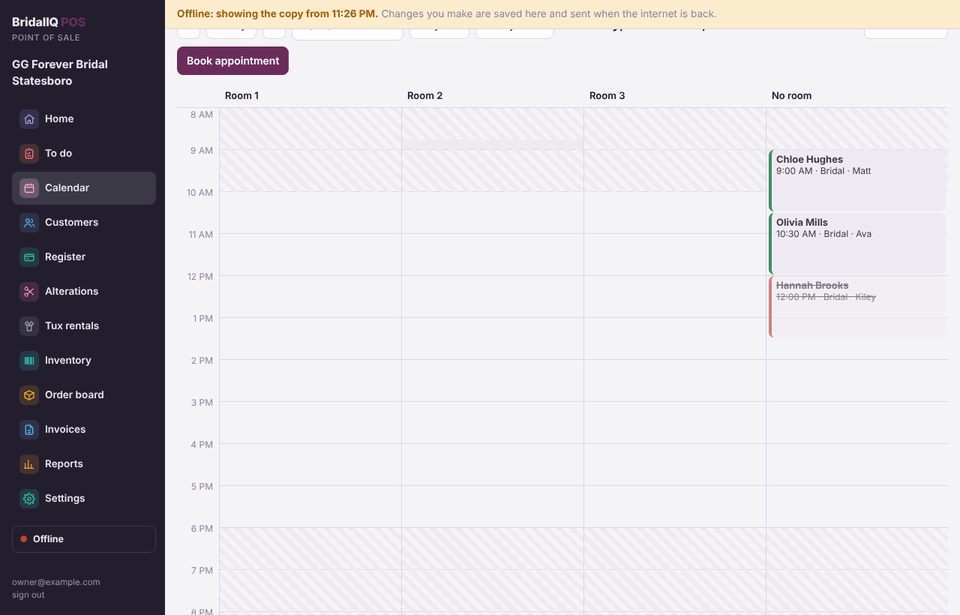
How you know
The left bar shows Online or Offline. When offline, a yellow bar at the top says what time the copy is from. Click the indicator to see what is waiting to send.
What works offline
- Checking brides in and marking purchased, thinking or walked.
- Adding notes to a customer.
- Taking cash and check payments, and recording a card run on another machine.
- Ringing up a sale of items you have on hand.
- Looking up the calendar, customers and open tickets from the copy.
Anything else (special orders, layaways, quotes, booking, ordering, refunds) says You're offline. This needs the internet.
When the internet comes back
- The POS sends your changes in the order you made them and tells you how many were sent.
- If something can't be saved (for example, someone else canceled that appointment), it goes to Needs a look. Click the indicator, fix it, and press Done, I fixed it.
The POS opens without internet on any device that has opened it before. Help pages you have already opened are kept too.
Card payments: the card readers need the internet. Offline, run the card on another machine and record it as Card (other machine); it is sent when you are back online. See Card payments.